Hi All!
I'm migrating to a new site, WildInventor.com ( if that doesn't work yet, please visit www.narobo.com/wildinventor )
Please check it out and update your subscriptions!
I'll be writing a ton about engineering and design, splashed with stories of my outdoor adventures.
See you on the other side!
Friday, July 6, 2012


Monday, August 29, 2011
Need Me to Design and Create Projects?
Lately I've been wanting to take on another project or two.
So I'm available for hire to design or create any project or product. I usually charge fair rates, sometimes don't even charge at all. Its usually just a matter of how interesting the project is to me ;)
I live and breathe electronics and microcontrollers, especially PCB design and microcontroller firmware coding.
Email eric at narobo dot com if you have a project or idea in mind.
Final Project - Knock Lock
Heres my final project for digital logic design. Video after the schematic. Notice how little chips were used, not a single microcontroller, all logic design. And if you're experienced with electronics you'll pick up on the little tricks I used to save chips - using a XOR as an inverter, using slower chips so that I could keep a single MRST signal, some other tricks hidden on the page.


New Post - my lab
Been a while since the last post, been developing a secret product and a few not so secret projects.
More posts will be following.
Anyways, here are some pictures of my home workshop for the curious or interested. Check out my space


More posts will be following.
Anyways, here are some pictures of my home workshop for the curious or interested. Check out my space


Monday, May 2, 2011
DroneCell Update

The new DroneCells are available and on sale at DIYdrones.com
http://store.diydrones.com/DroneCell_p/br-dronecell-01.htm
They cost $120.00 and come with an antenna and antenna cable included.
If you're considering using the DroneCell in an industrial application or you're considering to incorporate it in a product - please email me! There are significant price breaks for industrial users and applications!
Wednesday, July 21, 2010
DroneCells Available Now!

So I just released the DroneCell at HOPE this past weekend. I also made a cool demo of the DroneCell for the hacker conference:
They're $100 and come with antenna and antenna cable included. They come preset to 115200 baud and you can easily set it to whatever baud rate you'd like over UART.
Buy it here: http://themakerspace.com/index.php?main_page=product_info&cPath=5&products_id=6
Let me know of any cool projects you guys make!
Wednesday, July 14, 2010
Configuring Microcontroller Settings on DroneCell
Simple tutorial on configuring DroneCell for microcontroller interface
http://www.youtube.com/watch?v=ObfD645UhnM
http://www.youtube.com/watch?v=ObfD645UhnM
Sunday, July 11, 2010
DroneCell Video Tutorials
DroneCells are making their way to the proper distributors, and I've been working hard on software and documentation.
Here are some video tutorials showing how easy it is to utilize the DroneCell.
Introduction to DroneCell
http://www.youtube.com/watch?v=71IFZ8_cvEI
Hardware Setup
http://www.youtube.com/watch?v=fmDN1qngPTE
Phone Calls
http://www.youtube.com/watch?v=7is4PnLacCA
Text Messages
http://www.youtube.com/watch?v=GD8DLryzSL0
Enjoy!
Here are some video tutorials showing how easy it is to utilize the DroneCell.
Introduction to DroneCell
http://www.youtube.com/watch?v=71IFZ8_cvEI
Hardware Setup
http://www.youtube.com/watch?v=fmDN1qngPTE
Phone Calls
http://www.youtube.com/watch?v=7is4PnLacCA
Text Messages
http://www.youtube.com/watch?v=GD8DLryzSL0
Enjoy!
Sunday, June 20, 2010
DroneCell Final Description

The DroneCell is a cell phone for your robotics/electronics/minicomputer/anything project. You can make and receive phone calls, send and receive text messages, communicate over the Internet, and do nearly everything else your regular phone can do.
It has a simple UART interface that can easily connected to any 3.3V or 5V device, like most AVRs, PICs. All the necessary voltage level shifting is done onboard, so there isn't any headache. Connect it to your Arduino, your STAMP, your Gumstix board, your Axon, your whatever.
It is completely breadboard compatible, so its perfect for any prototyping rig. Plus it comes with two neat little LED indication lights, so you can visually see and understand whats happening. Additionally, there are several pins that give you extra functionality.
No more stupid Xbees that have limited range, use DroneCell for nearly unlimited range! It will work anywhere you have a cell tower. Control your robot in Los Angeles from your laptop in New York City.
Imagine sending a text message to your custom circuit which starts your car. Or sending data wirelessly over the Internet to your UAV that flying over Afghanistan. Or getting GPS and weather data from your high altitude air balloon. All this is possible with DroneCell!
FEATURES:
LED indication for both network status and power
Small footprint (5cm x 5cm)
Pushbutton power up
Lots of filtering capacitors for smooth voltage supply
Breadboard compatible for easy prototyping
5VDC-16VDC power supply input
3.3V to 5V UART Interface (voltage-shifting is done on board)
High serial data rate (up to 115200 baud)
GPRS communication rate (86.5 kbps downlink) – cellular to server communication
CSD (up to 14.4 kbps) – cellular to cellular communication
Software configurable baud rate
Works with any SIM card
Built-in SIM card holder
Quad band cellular connectivity
Internal switch to detect SIM card presence
Dial and receive phone calls (however, no microphone or speaker interface setup)
Send and receive text messages
Send and receive data to any Internet connected computer
Send and receive data over TCP or UDP sockets
Send and receive emails
Communicate with FTP servers
Super long range (anywhere there is cell reception)
High altitude (at least 10,000 feet, up to 30,000)
Phonebook entries and storage
Software libraries for AVR
Real time clock, synced to cellular tower time
User set alarms
POTENTIAL APPLICATIONS:
UAVs and Balloons – live data reporting – GPS, pressure, altitude, streaming video
set waypoints, camera commands, etc.
Cars- remote start, car alarm notification, GPS tracking
Security systems – cars, boards, sheds, etc.
Home automation – thermostat control, lighting
Robots – data transfer, remote commands
Processors and computers- data transfer, wireless ssh, telnet
Wireless Industrial Systems – reset computers, activate pumps
Wireless Asset tracking – GPS track your car, your spouse, your cat
DATA TRANSFER METHODS:
iPod server/client socket app
Hyperterminal
Custom socket server/client – Perl, Python, C#, etc.
Tuesday, June 15, 2010
New DroneCell - Pictures and Updates

Hello All,
I am happy to say that progress is moving along nicely, I have enough parts for a batch of around 50 DroneCells, so they should be in stores in the very near future!
I'm working on compiling a Getting Started Guide, as well as filming some video tutorials of the DroneCell in use.
So as promised, here are some pictures. Note the addition of the pushbutton, SIM card holder, and the tons of additional filtering capacitors.


Wednesday, May 12, 2010
DroneCell Updates
I'm sorry for all the delays.
I had a batch of DroneCells that required external SIM card holders. After conferring with some friends in the industry, I've made the decision to release a new version of the DroneCell, a version that has a built-in card holder. This obviously has resulted in some delay, so expect the final release in stores to happen within the next three weeks.
As of now, DIYdrones will be stocking the DroneCells, as well as one more electronic hacker oriented store.
Some stuff I added to the new DroneCell:
Built in SIM card holder
Better power supply regulation
Power on/off button for manual turning on
Pretty much everything else is the same, so all coding samples I have will work exactly the same way. Final price on these babies will probably be close to $100 retail.
I'll have some more posts as they become available. I'm also considering some sort of preordering thing set up, because the demand for this has been higher than I expected, and we may run out of DroneCells from the first batch.
I had a batch of DroneCells that required external SIM card holders. After conferring with some friends in the industry, I've made the decision to release a new version of the DroneCell, a version that has a built-in card holder. This obviously has resulted in some delay, so expect the final release in stores to happen within the next three weeks.
As of now, DIYdrones will be stocking the DroneCells, as well as one more electronic hacker oriented store.
Some stuff I added to the new DroneCell:
Built in SIM card holder
Better power supply regulation
Power on/off button for manual turning on
Pretty much everything else is the same, so all coding samples I have will work exactly the same way. Final price on these babies will probably be close to $100 retail.
I'll have some more posts as they become available. I'm also considering some sort of preordering thing set up, because the demand for this has been higher than I expected, and we may run out of DroneCells from the first batch.
Sunday, March 21, 2010
DroneCell Update: Ring,Ring Video
I've taken a short demo video of the DroneCell interacting with my laptop and uploaded it online to Youtube.
The video shows how easy it is to get things running with the DroneCell. I demonstrate how easy it is to receive a phone call and to dial the DroneCell. In the next series of videos I'll be detailing how to send text messages, send emails, download info from a website, transfer data with a personal server, and more!
Enjoy the video: http://www.youtube.com/watch?v=HcSa60gpv-E
The video shows how easy it is to get things running with the DroneCell. I demonstrate how easy it is to receive a phone call and to dial the DroneCell. In the next series of videos I'll be detailing how to send text messages, send emails, download info from a website, transfer data with a personal server, and more!
Enjoy the video: http://www.youtube.com/watch?v=HcSa60gpv-E
BattleBots Documentary
I got this in my email today:
I'm working on a documentary on high school BattleBots. I've been following multiple teams around since August, leading up to the National Championship.
I'm trying to raise funds to film the championship with a multi camera crew, as well as travel to San Francisco to interview the BattleBot creators and builders.
The project is at: http://www.kickstarter.com/projects/jdaoud/bots-high-documentary-on-high-school-combat-robo
If you would be able to post something about this, it would greatly help me reach my goal and make this the best film it can be. Plus it'll raise awareness of the film at the production stage, so people can be involved in how the film turns out.
I think its great that there is more awareness with regards to robotics, especially high school level robotics competitions. If you have a couple extra bucks to spare, you should consider donating some to his worthy cause. You even get cool promo items like T-shirts and the like.
I'm working on a documentary on high school BattleBots. I've been following multiple teams around since August, leading up to the National Championship.
I'm trying to raise funds to film the championship with a multi camera crew, as well as travel to San Francisco to interview the BattleBot creators and builders.
The project is at: http://www.kickstarter.com/projects/jdaoud/bots-high-documentary-on-high-school-combat-robo
If you would be able to post something about this, it would greatly help me reach my goal and make this the best film it can be. Plus it'll raise awareness of the film at the production stage, so people can be involved in how the film turns out.
I think its great that there is more awareness with regards to robotics, especially high school level robotics competitions. If you have a couple extra bucks to spare, you should consider donating some to his worthy cause. You even get cool promo items like T-shirts and the like.
Wednesday, March 10, 2010

Tuesday, March 9, 2010
Announcing my New Product: the DroneCell
Announcing my new product... drum roll please..... DroneCell!
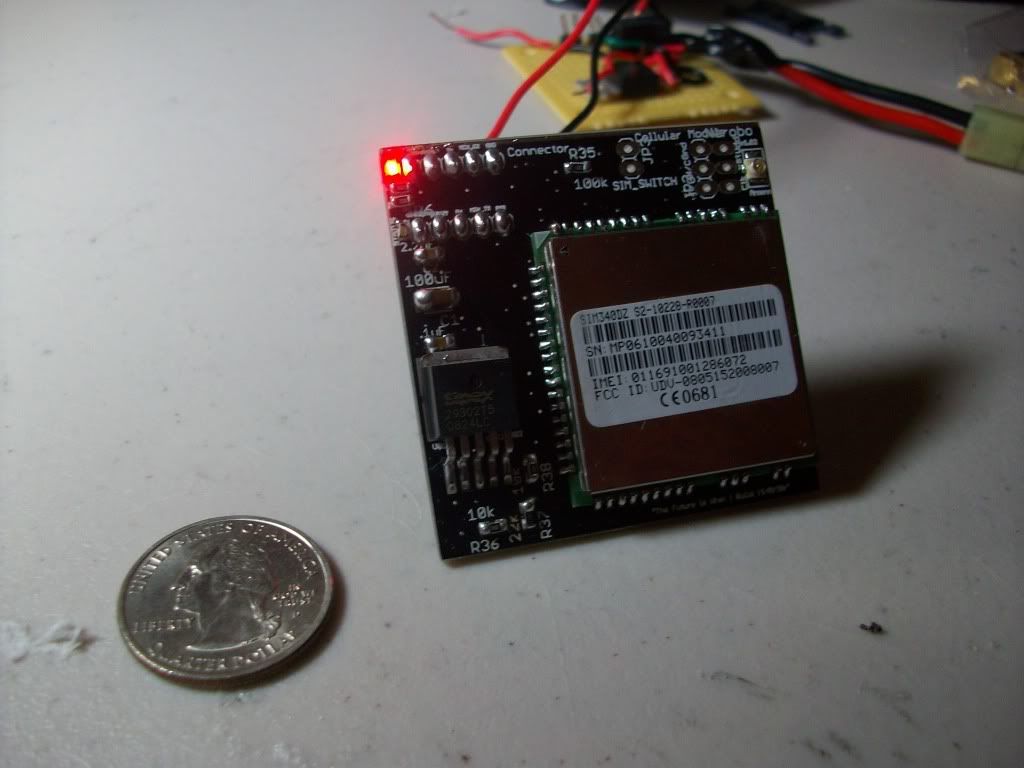
What is it? Its a cell phone for your robotics/electronics/minicomputer/anything project.
It has a simple 3.3V to 5V UART interface, so it can be easily connected to any 3.3V or 5V device, like most AVRs, PICs. All the necessary voltage level shifting is done onboard, so there isn't any headache. Connect it to your Arduino, your STAMP, your Gumstix board, your Axon, your whatever.
It is completely breadboard compatible, so its perfect for any prototyping rig. Plus it comes with two neat little LED indication lights, so you can visually see and understand whats happening.
No more stupid Xbees that have limited range, use DroneCell for nearly unlimited range! It will work anywhere you have a cell tower. Control your robot in Los Angeles from your laptop in New York City.
Imagine sending a text message to your custom circuit which starts your car. Or sending data wirelessly over the Internet to your UAV that flying over Afghanistan. Or getting GPS and weather data from your high altitude air balloon. Or even having your butler robot( like my own Chives, look on Narobo.com for details) dial your cell phone and email you when he detects an intruder. All this is possible with DroneCell!
I actually used a slightly different version of the DroneCell in a major commercial product, so I have tons of code available. All the hard work is done, so enjoy it in your different projects!
It is completely breadboard compatible, so its perfect for any prototyping rig. Plus it comes with two neat little LED indication lights, so you can visually see and understand whats happening.
No more stupid Xbees that have limited range, use DroneCell for nearly unlimited range! It will work anywhere you have a cell tower. Control your robot in Los Angeles from your laptop in New York City.
Imagine sending a text message to your custom circuit which starts your car. Or sending data wirelessly over the Internet to your UAV that flying over Afghanistan. Or getting GPS and weather data from your high altitude air balloon. Or even having your butler robot( like my own Chives, look on Narobo.com for details) dial your cell phone and email you when he detects an intruder. All this is possible with DroneCell!
I actually used a slightly different version of the DroneCell in a major commercial product, so I have tons of code available. All the hard work is done, so enjoy it in your different projects!
Videos and software to be uploaded this weekend and next week. I'll post up the new info as its available.
Currently, I am sending out samples to several retail stores and very few personal friends. Expect DroneCell in a robotics store near you in about 2 weeks. If you absolute MUST have a DroneCell, email me and we can work something out.
Heres a laundry list of the features and possible applications:
FEATURES:
LED indication for both network status and power
Small footprint (5cm x 5cm)
Breadboard compatible for easy prototyping
5VDC-16VDC power supply input
3.3V to 5V UART Interface (voltage-shifting is done on board)
High serial data rate (up to 115200 baud)
GPRS communication rate (86.5 kbps downlink) – cellular to server communication
CSD (up to 14.4 kbps) – cellular to cellular communication
Software configurable baud rate
Works with any SIM card
Quad band cellular connectivity
Internal switch to detect SIM card presence
Dial and receive phone calls (however, no microphone or speaker interface setup)
Send and receive text messages
Send and receive data to any Internet connected computer
Send and receive data over TCP or UDP sockets
Super long range (anywhere there is cell reception)
High altitude (at least 10,000 feet, up to 30,000)
Phonebook entries and storage
Software libraries for AVR
Real time clock, synced to cellular tower time
User set alarms
POTENTIAL APPLICATIONS:
UAVs and Balloons – live data reporting – GPS, pressure, altitude, streaming video
set waypoints, camera commands, etc.
Cars- remote start, car alarm notification, GPS tracking
Security systems – cars, boards, sheds, etc.
Home automation – thermostat control, lighting
Robots – data transfer, remote commands
Processors and computers- data transfer, wireless ssh, telnet
Wireless Industrial Systems – reset computers, activate pumps
Wireless Asset tracking – GPS track your car, your spouse, your cat
DATA TRANSFER METHODS:
iPod server/client socket app
Hyperterminal
Custom socket server/client – Perl, Python, C#, etc.
Currently, I am sending out samples to several retail stores and very few personal friends. Expect DroneCell in a robotics store near you in about 2 weeks. If you absolute MUST have a DroneCell, email me and we can work something out.
Heres a laundry list of the features and possible applications:
FEATURES:
LED indication for both network status and power
Small footprint (5cm x 5cm)
Breadboard compatible for easy prototyping
5VDC-16VDC power supply input
3.3V to 5V UART Interface (voltage-shifting is done on board)
High serial data rate (up to 115200 baud)
GPRS communication rate (86.5 kbps downlink) – cellular to server communication
CSD (up to 14.4 kbps) – cellular to cellular communication
Software configurable baud rate
Works with any SIM card
Quad band cellular connectivity
Internal switch to detect SIM card presence
Dial and receive phone calls (however, no microphone or speaker interface setup)
Send and receive text messages
Send and receive data to any Internet connected computer
Send and receive data over TCP or UDP sockets
Super long range (anywhere there is cell reception)
High altitude (at least 10,000 feet, up to 30,000)
Phonebook entries and storage
Software libraries for AVR
Real time clock, synced to cellular tower time
User set alarms
POTENTIAL APPLICATIONS:
UAVs and Balloons – live data reporting – GPS, pressure, altitude, streaming video
set waypoints, camera commands, etc.
Cars- remote start, car alarm notification, GPS tracking
Security systems – cars, boards, sheds, etc.
Home automation – thermostat control, lighting
Robots – data transfer, remote commands
Processors and computers- data transfer, wireless ssh, telnet
Wireless Industrial Systems – reset computers, activate pumps
Wireless Asset tracking – GPS track your car, your spouse, your cat
DATA TRANSFER METHODS:
iPod server/client socket app
Hyperterminal
Custom socket server/client – Perl, Python, C#, etc.
Friday, October 2, 2009
Divide Bits into Bytes
Another useful Python script. Divides text of bits into 8 bits at a time, so you can see everything byte by byte.
Python Code:
>>> string = raw_input('String = ')
String = 1 1 1 0 0 1 0 0 0 0 1 0 1 0 1 0 1 0 1 0 1 0 1 0 1 0 1 0 1 0 1 0 1 0 1 0 1 0 1 0 1 0 1 0 1 0 1 0 1 0 1 0 1 0 1 0 1 0 1 0 1 0 1 0 1 0 1 0 1 0 1 0 1 0 1 0 1 0 1 0 1 0 1 0 1 0 1 0 1 0 1 0 1 0 1 0 0 0 0 0 0 0 0 0 0 0 0 0 0 0 0 0 0 0 0 0 0 0 0 0 0 0 0 0 0 0 0 0
>>> " ".join(string[i:i+16] for i in range(0,len(string),16))
'1 1 1 0 0 1 0 0 0 0 1 0 1 0 1 0 1 0 1 0 1 0 1 0 1 0 1 0 1 0 1 0 1 0 1 0 1 0 1 0 1 0 1 0 1 0 1 0 1 0 1 0 1 0 1 0 1 0 1 0 1 0 1 0 1 0 1 0 1 0 1 0 1 0 1 0 1 0 1 0 1 0 1 0 1 0 1 0 1 0 1 0 1 0 1 0 0 0 0 0 0 0 0 0 0 0 0 0 0 0 0 0 0 0 0 0 0 0 0 0 0 0 0 0 0 0 0 0'
Thanks Keith and #python IRC
Python Code:
>>> string = raw_input('String = ')
String = 1 1 1 0 0 1 0 0 0 0 1 0 1 0 1 0 1 0 1 0 1 0 1 0 1 0 1 0 1 0 1 0 1 0 1 0 1 0 1 0 1 0 1 0 1 0 1 0 1 0 1 0 1 0 1 0 1 0 1 0 1 0 1 0 1 0 1 0 1 0 1 0 1 0 1 0 1 0 1 0 1 0 1 0 1 0 1 0 1 0 1 0 1 0 1 0 0 0 0 0 0 0 0 0 0 0 0 0 0 0 0 0 0 0 0 0 0 0 0 0 0 0 0 0 0 0 0 0
>>> " ".join(string[i:i+16] for i in range(0,len(string),16))
'1 1 1 0 0 1 0 0 0 0 1 0 1 0 1 0 1 0 1 0 1 0 1 0 1 0 1 0 1 0 1 0 1 0 1 0 1 0 1 0 1 0 1 0 1 0 1 0 1 0 1 0 1 0 1 0 1 0 1 0 1 0 1 0 1 0 1 0 1 0 1 0 1 0 1 0 1 0 1 0 1 0 1 0 1 0 1 0 1 0 1 0 1 0 1 0 0 0 0 0 0 0 0 0 0 0 0 0 0 0 0 0 0 0 0 0 0 0 0 0 0 0 0 0 0 0 0 0'
Thanks Keith and #python IRC
Reverse Text in Python
I've been doing a lot of work lately dealing with bits, and many times I've had to reverse the bit text in order to actually see what was being submitted ( most significant bits are first not last). I used to do it by hand, but I now use a handy one line python script.
The raw data from my microcontroller:
0 0 0 0 0 0 0 0 0 0 0 0 0 0 0 0 0 0 0 0 0 0 0 0 0 0 0 0 0 0 0 0 0 1 0 1 0 1 0 1 0 1 0 1 0 1 0 1 0 1 0 1 0 1 0 1 0 1 0 1 0 1 0 1 0 1 0 1 0 1 0 1 0 1 0 1 0 1 0 1 0 1 0 1 0 1 0 1 0 1 0 1 0 1 0 1 0 1 0 1 0 1 0 1 0 1 0 1 0 1 0 1 0 1 0 1 0 1 0 0 0 0 1 0 0 1 1 1
The one line Python script :
print raw_input("Enter String to Reverse: ")[::-1]
Open up terminal and go into python. Type in that script and press enter.
Python 2.5.1 (r251:54863, Feb 6 2009, 19:02:12)
[GCC 4.0.1 (Apple Inc. build 5465)] on darwin
Type "help", "copyright", "credits" or "license" for more information.
>>> print raw_input("Enter String to Reverse: ")[::-1]
Enter String to Reverse:0 0 0 0 0 0 0 0 0 0 0 0 0 0 0 0 0 0 0 0 0 0 0 0 0 0 0 0 0 0 0 0 0 1 0 1 0 1 0 1 0 1 0 1 0 1 0 1 0 1 0 1 0 1 0 1 0 1 0 1 0 1 0 1 0 1 0 1 0 1 0 1 0 1 0 1 0 1 0 1 0 1 0 1 0 1 0 1 0 1 0 1 0 1 0 1 0 1 0 1 0 1 0 1 0 1 0 1 0 1 0 1 0 1 0 1 0 1 0 0 0 0 1 0 0 1 1 1
1 1 1 0 0 1 0 0 0 0 1 0 1 0 1 0 1 0 1 0 1 0 1 0 1 0 1 0 1 0 1 0 1 0 1 0 1 0 1 0 1 0 1 0 1 0 1 0 1 0 1 0 1 0 1 0 1 0 1 0 1 0 1 0 1 0 1 0 1 0 1 0 1 0 1 0 1 0 1 0 1 0 1 0 1 0 1 0 1 0 1 0 1 0 1 0 0 0 0 0 0 0 0 0 0 0 0 0 0 0 0 0 0 0 0 0 0 0 0 0 0 0 0 0 0 0 0 0
The reversed code:
1 1 1 0 0 1 0 0 0 0 1 0 1 0 1 0 1 0 1 0 1 0 1 0 1 0 1 0 1 0 1 0 1 0 1 0 1 0 1 0 1 0 1 0 1 0 1 0 1 0 1 0 1 0 1 0 1 0 1 0 1 0 1 0 1 0 1 0 1 0 1 0 1 0 1 0 1 0 1 0 1 0 1 0 1 0 1 0 1 0 1 0 1 0 1 0 0 0 0 0 0 0 0 0 0 0 0 0 0 0 0 0 0 0 0 0 0 0 0 0 0 0 0 0 0 0 0 0
Special thanks to Keith!
The raw data from my microcontroller:
0 0 0 0 0 0 0 0 0 0 0 0 0 0 0 0 0 0 0 0 0 0 0 0 0 0 0 0 0 0 0 0 0 1 0 1 0 1 0 1 0 1 0 1 0 1 0 1 0 1 0 1 0 1 0 1 0 1 0 1 0 1 0 1 0 1 0 1 0 1 0 1 0 1 0 1 0 1 0 1 0 1 0 1 0 1 0 1 0 1 0 1 0 1 0 1 0 1 0 1 0 1 0 1 0 1 0 1 0 1 0 1 0 1 0 1 0 1 0 0 0 0 1 0 0 1 1 1
The one line Python script :
print raw_input("Enter String to Reverse: ")[::-1]
Open up terminal and go into python. Type in that script and press enter.
Python 2.5.1 (r251:54863, Feb 6 2009, 19:02:12)
[GCC 4.0.1 (Apple Inc. build 5465)] on darwin
Type "help", "copyright", "credits" or "license" for more information.
>>> print raw_input("Enter String to Reverse: ")[::-1]
Enter String to Reverse:0 0 0 0 0 0 0 0 0 0 0 0 0 0 0 0 0 0 0 0 0 0 0 0 0 0 0 0 0 0 0 0 0 1 0 1 0 1 0 1 0 1 0 1 0 1 0 1 0 1 0 1 0 1 0 1 0 1 0 1 0 1 0 1 0 1 0 1 0 1 0 1 0 1 0 1 0 1 0 1 0 1 0 1 0 1 0 1 0 1 0 1 0 1 0 1 0 1 0 1 0 1 0 1 0 1 0 1 0 1 0 1 0 1 0 1 0 1 0 0 0 0 1 0 0 1 1 1
1 1 1 0 0 1 0 0 0 0 1 0 1 0 1 0 1 0 1 0 1 0 1 0 1 0 1 0 1 0 1 0 1 0 1 0 1 0 1 0 1 0 1 0 1 0 1 0 1 0 1 0 1 0 1 0 1 0 1 0 1 0 1 0 1 0 1 0 1 0 1 0 1 0 1 0 1 0 1 0 1 0 1 0 1 0 1 0 1 0 1 0 1 0 1 0 0 0 0 0 0 0 0 0 0 0 0 0 0 0 0 0 0 0 0 0 0 0 0 0 0 0 0 0 0 0 0 0
The reversed code:
1 1 1 0 0 1 0 0 0 0 1 0 1 0 1 0 1 0 1 0 1 0 1 0 1 0 1 0 1 0 1 0 1 0 1 0 1 0 1 0 1 0 1 0 1 0 1 0 1 0 1 0 1 0 1 0 1 0 1 0 1 0 1 0 1 0 1 0 1 0 1 0 1 0 1 0 1 0 1 0 1 0 1 0 1 0 1 0 1 0 1 0 1 0 1 0 0 0 0 0 0 0 0 0 0 0 0 0 0 0 0 0 0 0 0 0 0 0 0 0 0 0 0 0 0 0 0 0
Special thanks to Keith!
Wednesday, September 30, 2009
The truth about leaving light bulbs on
A common piece of urban folklore: Its better to leave a light on than to turn it off and turn it on a half hour later. The theory is that the bulb takes more energy on startup than it takes while in regular operation.
Time to debunk this foolish folklore with some math and specifications.( for incandescent bulbs)
Cold resistance of a tungsten incandescent bulb is usually around 1/10 or 1/15 the hot resistance of the bulb.( depending on the bulb). The startup time for the bulb to get from cold resistance to hot resistance is at maximum 1/5 of a second.
So when the bulb is starting up and turning on , it has cold resistance. After the the bulb is all turned on, it now has the higher resistance.
And we all know that with great power comes great current squared times resistance, or power = current* resistance. So Power = Current^2 * Resistance.
Lets take a common incandescent bulb with the following specs:
100W power consumption
120 volt source
Hot Resistance of 150 ohms
Cold resistance of 10 ohms
Startup Time(cold to hot) of .20 seconds
So that means that during that startup time , you will spend 3.16 amps(100 = i^2 * 10) for .2 seconds . Whereas with the hot resistance you will spend 0.81 amps(100 = i^2 * 150).
So lets see: upon startup you are spending around 4 times(3.16/.81=3.9) as much energy as you would spend , but only for 1/5 of a second.
Lets solve to see how many seconds of hot current draw equals cold current draw.
3.16 amps * .2 seconds = .81 amps * X seconds
X seconds = .78 seconds
Conclusion:
It takes less than one second to compensate for that startup current "surge"! Urban myth is busted!
Time to debunk this foolish folklore with some math and specifications.( for incandescent bulbs)
Cold resistance of a tungsten incandescent bulb is usually around 1/10 or 1/15 the hot resistance of the bulb.( depending on the bulb). The startup time for the bulb to get from cold resistance to hot resistance is at maximum 1/5 of a second.
So when the bulb is starting up and turning on , it has cold resistance. After the the bulb is all turned on, it now has the higher resistance.
And we all know that with great power comes great current squared times resistance, or power = current* resistance. So Power = Current^2 * Resistance.
Lets take a common incandescent bulb with the following specs:
100W power consumption
120 volt source
Hot Resistance of 150 ohms
Cold resistance of 10 ohms
Startup Time(cold to hot) of .20 seconds
So that means that during that startup time , you will spend 3.16 amps(100 = i^2 * 10) for .2 seconds . Whereas with the hot resistance you will spend 0.81 amps(100 = i^2 * 150).
So lets see: upon startup you are spending around 4 times(3.16/.81=3.9) as much energy as you would spend , but only for 1/5 of a second.
Lets solve to see how many seconds of hot current draw equals cold current draw.
3.16 amps * .2 seconds = .81 amps * X seconds
X seconds = .78 seconds
Conclusion:
It takes less than one second to compensate for that startup current "surge"! Urban myth is busted!
Friday, August 28, 2009
Working at BugLabs
I've been working at BugLabs - buglabs.net for the past few weeks. Its been lots of fun and I got to play with a lot of cool stuff.
RFID Module I made: http://bugcommunity.com/wiki/index.php/VonHippel_RFID_Reader
I also took my bipedal robot and mounted a BugBase onto it. BugBase talks to my custom Serial Servo Controller.
RFID Module I made: http://bugcommunity.com/wiki/index.php/VonHippel_RFID_Reader
I also took my bipedal robot and mounted a BugBase onto it. BugBase talks to my custom Serial Servo Controller.
Subscribe to:
Posts (Atom)
