I finished up some coding and finally have the robot following a line!
Here's a video:
Monday, March 2, 2009


Saturday, February 21, 2009
Line Follower Using Vision Update!
Finally an update on my newest line following robot. This robot has 4x4 drive and has a CMUcam and an IR rangefinder mounted on board. A spotlight and a servo assist the CMUcam. All the processing is done using the Axon microcontroller.
I wrote up my own code for controlling the CMUcam from the Axon, and I will post source code in about a week.
Here is a quick video I made of the robot tracking a red box.
I wrote up my own code for controlling the CMUcam from the Axon, and I will post source code in about a week.
Here is a quick video I made of the robot tracking a red box.
Tuesday, January 20, 2009
Speed Simulation

I wrote up a simple Javascript web application to simulate the speed of your robot compared to other well known objects ( a bike, a car, etc.). There is also a football field in the background so you can see your robot's speed in relation to a football field.
Right now the simulation only supports whole numbers and only only operates in the feet per second resolution. I will add on support for meters per second later.
Also I am 75% done with the simulation portion for slow speeds in the inches per second scale. That part has a yardstick in the background. That should be ready in a few days.
Heres the link to the simulation , just enter the speed in feet per second in the text box above
http://www.narobo.com/projects/software/speed/speed.html
,Eric
Tuesday, January 13, 2009
New Layout for Narobo.com
Just finished the new and improved layout of my main website - Narobo.com
Put in some javascript and also put up the Narobo Logo.

Put in some javascript and also put up the Narobo Logo.
Roboduino on MAKE !
The Roboduino was featured on MAKE: Blog.
http://blog.makezine.com/archive/2009/01/roboduino.html
Been busy with the Roboduino lately, so not much more updates.
I am working on a simulation to see relative speed in relation to a well know object in the background(ruler, football field, etc.) . It will be useful when you are trying to figure out relatively how fast an object should be going . I would also add other moving objects that would move alongside the object ( a car, a person running , bicycle, etc.). I plan to add text boxes to enter in speed and also checkboxes to select which objects would show up on screen.
,Eric
http://blog.makezine.com/archive/2009/01/roboduino.html
Been busy with the Roboduino lately, so not much more updates.
I am working on a simulation to see relative speed in relation to a well know object in the background(ruler, football field, etc.) . It will be useful when you are trying to figure out relatively how fast an object should be going . I would also add other moving objects that would move alongside the object ( a car, a person running , bicycle, etc.). I plan to add text boxes to enter in speed and also checkboxes to select which objects would show up on screen.
,Eric
Tuesday, December 30, 2008
Implementing RF Modules Tutorial
I finally wrote a tutorial on using those pesky RF link modules. When I first started out using the RF modules there were only two tutorials available and they weren't so clear. After a month of struggling with the RF , I managed to get it to work. I had some spare time on my hands so I wrote up a giant tutorial on using the RF modules - its filled with code, schematics, and helpful tips.
Link : http://narobo.com/articles/rfmodules.html
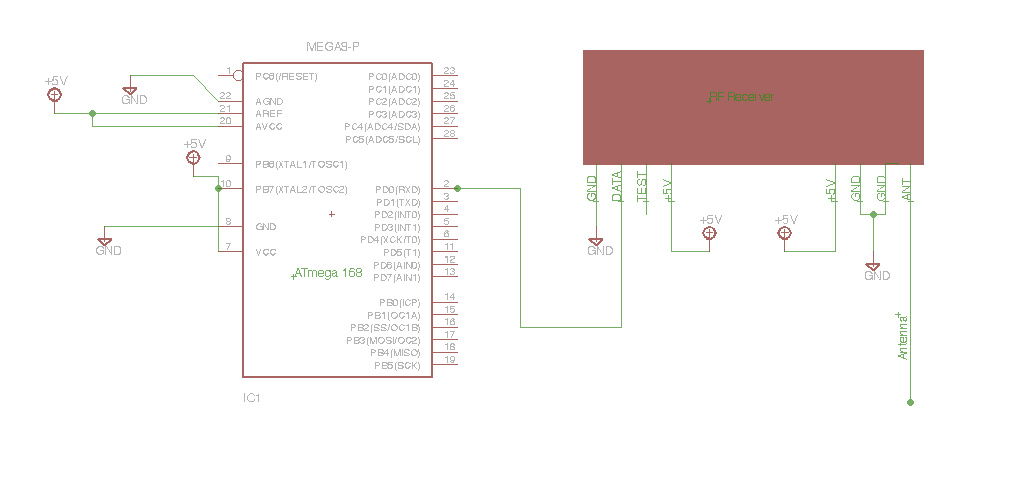
Link : http://narobo.com/articles/rfmodules.html
Thursday, December 11, 2008
The Roboduino is finally on sale!!!
Its $40 for a kit and $55 for an assembled version
More info and sales information here:
http://curiousinventor.com/kits/roboduino
Features / Specs:
* 100% Compatible with Arduino software.
* Power buses along side pwm and analog pins easily accept standard servo and sensor connectors.
* Powered can be supplied from USB, barrel plug or 3-pin male header. You'll need a suitable power supply when driving multiple servos.
* dedicated UART 3-pin male header
* 6 PWM outputs with neighboring unregulated power pins
* 6 analog pins
* 14 digital pins
* Reverse polarity protection for board circuitry (not for unregulated power pins)
* Optional I2C pull-up resistor locations
Its $40 for a kit and $55 for an assembled version
More info and sales information here:
http://curiousinventor.com/kits/roboduino
Features / Specs:
* 100% Compatible with Arduino software.
* Power buses along side pwm and analog pins easily accept standard servo and sensor connectors.
* Powered can be supplied from USB, barrel plug or 3-pin male header. You'll need a suitable power supply when driving multiple servos.
* dedicated UART 3-pin male header
* 6 PWM outputs with neighboring unregulated power pins
* 6 analog pins
* 14 digital pins
* Reverse polarity protection for board circuitry (not for unregulated power pins)
* Optional I2C pull-up resistor locations

Subscribe to:
Posts (Atom)
